Buy. Develop. Sell.
All on one site.
Every trade. Every project. One platform.
Properties tells you what a site allows. Planning gets the pack ready to lodge. Marketplace brings in the trades. Then you run the build. Start with any Australian address below.
Already have an account? Sign in

Australia's construction jobs run through the same five questions. What does this site allow? What goes in the planning pack? Who is going to do the work, and what will they charge? When it is agreed, who signs the contract? And once it starts, what actually happened on the job? Urban Pulse answers all five in one place, for builders, consultants, developers, trades, homeowners, buyers and selling agents. One fence, stated up front: Urban Pulse prepares your planning pack and you lodge it yourself on the NSW Planning Portal. We do not lodge for you and we do not promise an approval.
Urban Pulse is an Australian construction platform: site intelligence, town planning, contractor marketplace, Send & Sign, and project management in one workspace.
What does this site allow?
Every job starts with an address and a question the council answers in PDFs. Properties reads that address against live state planning services and returns the zone and its name, what the council allows on the site, the overlays sitting over it, and the likely approval pathway, in plain English rather than planning codes.
When the address does not match a property we hold, Properties shows you nothing: no zone, no default. When it matches but your council's own controls are not mapped, the figures you see are the state scheme's default, and they are labelled as that rather than as your council's schedule. Any overlay layer we did not read is listed as Not checked, and Not checked means we have not looked, not that the site is clear.
Seven states are live: New South Wales, Victoria, Queensland, Western Australia, South Australia, Tasmania and the ACT. New South Wales is the one state where we pull the mapped overlays for you, so the read goes furthest there. In Queensland we hold the councils' own rules, so what comes back is your council rather than the state default. The Northern Territory is not live.
Where the controls are mapped you get the building envelope as well: maximum height, maximum storeys, front, side and rear setbacks, maximum site coverage, minimum garden area and car parking. Path Advisor names the likely route, complying development, a development application, or exempt, and it names what would push a proposal to a full DA. A Preliminary Planning Investigation is where that becomes a written read of the site.
None of it is planning advice and none of it is a valuation. It is the site's own record, in front of you before you spend money on it.
What goes in the planning pack?
Once the site stacks up, the work becomes paperwork. Planning assembles your development application pack and hands it to you as a ready-to-lodge PDF, built from what you supply rather than from guesswork.
You then lodge that pack yourself on the NSW Planning Portal, record the lodgement, and mark it as lodged in Urban Pulse so the job knows where it stands. Urban Pulse never lodges on your behalf and never promises an approval outcome. The council decides.
Who does the work, and what will they charge?
Marketplace runs on invitations. You choose who quotes, they price the work, you compare and you award. Nothing goes to an open board, and nobody you did not ask turns up.
Licence, insurance and ABN are recorded on each profile, so you can read them beside the number instead of digging for them afterwards. Recorded is not verified, and your own checks still stand.
When it is agreed, who signs?
Send & Sign carries the quote, the contract, the variation and the report. The person you send to opens a private link in a browser, reads the document and signs on the same page. There is no account to create at their end and nothing to install.
You can see whether it has been opened and whether it has been signed, without ringing to ask. The document carries your business name and a monogram, and the signing page carries the Urban Pulse wordmark.
What actually happened on the job?
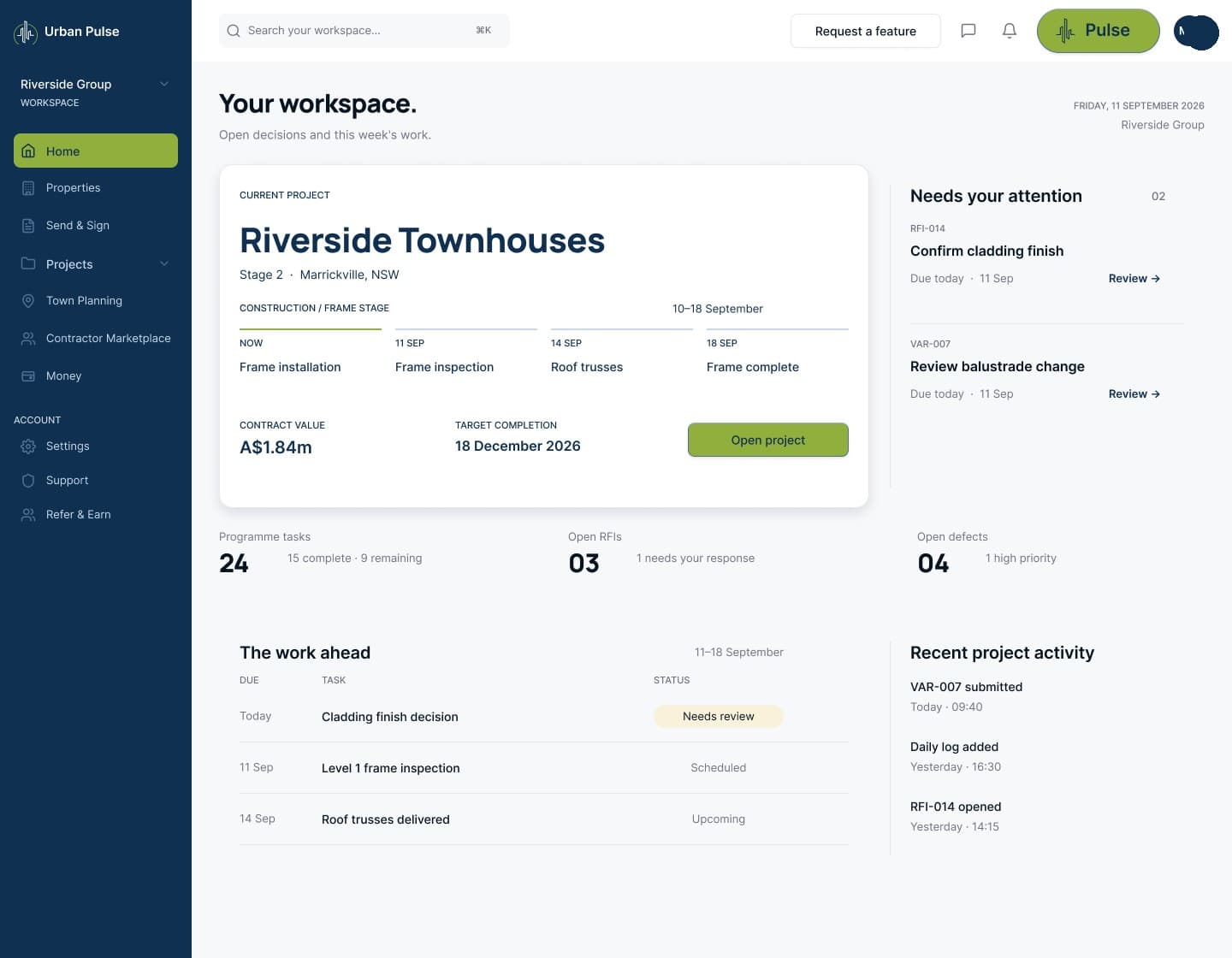
Once a job is awarded, Project Management keeps the programme and the milestones, the variations as they are raised, the defects, the RFIs and the daily record, so what happened is not stuck in a group chat.
Claims and retention are modelled here, the state of a claim, what is held, when it releases, and none of it moves money. Any release is authorised by a person.
The full 360 property cycle
Buy the site with council-aware intelligence, send and sign the deal, manage the approval, run the build, onboard contractors, then bring the finished project back to market.
Properties
Buy with site intelligence, then bring the finished project back to market.
Planning
Council-aware site intelligence, approval paths, conditions and handover.
Send & Sign
Transmit documents, sign contracts and keep every step on record.
Marketplace
Onboard architects, planners, engineers, trades and labour into the project.
Project Management
Manage the build, renovation or development from programme to handover.
Payments & Finance
Milestone payments, cover and finance built for your actual job.
Register interestGet in while it's early.
Come in now and your founding-member status holds across Urban Pulse. The first 250 set the standard for everyone who follows.
Your founding rate holds
The rate you join at is the rate you keep, for as long as you stay subscribed.
A Founding Member badge
It sits on your profile, where the people you work with can see it.
A direct line
Straight through to the people building it, not a queue.
A real vote
Your say on what we build next, counted with everyone else's.
Founder events and first looks
See what's next before anyone else, and meet the people behind it.
The referral reward
Credit on your own account when someone you bring across starts paying. One rate, the same for founding members and everyone else.
Run your whole build in one place
Every project, document, approval and trade job in one workspace, with what needs you next brought to the front, so nothing waits on someone remembering it.

Find your way in
Seven ways in, each built around the part of the job you live in.
Property buyers
See the zone, the overlays and the likely approval pathway before you bid.
For property buyersDevelopers
Test the site before you commit, then deliver it on one project record.
For developersBuilders
Price the job off the site, get the pack away, then invite the trades you want.
For buildersTrades
Quote the jobs you are invited to, then keep the record of what you did on site.
For tradesConsultants
Read the site, assemble the pack your client lodges, and quote the work you are invited to.
For consultantsHomeowners
Understand your block, invite the builders you want, and follow the job.
For homeownersSelling agents
Answer the development question from the address, with the labels intact.
For selling agentsWhat Urban Pulse does, and what it does not
What can I do on Urban Pulse today?
Five things, in the order a job runs. Read a site in Properties. Put a development application pack together in Planning. Invite a contractor to quote and award the work in Marketplace. Get quotes, contracts, variations and reports signed with Send & Sign. Run the job in Project Management.
Which states does Properties cover?
Seven: New South Wales, Victoria, Queensland, Western Australia, South Australia, Tasmania and the ACT. The depth is not identical across them. New South Wales is the only state where the mapped overlays are pulled for you. In Queensland the councils' own rules are held, so the figures are your council's rather than the state default. The Northern Territory is not live.
Does Urban Pulse lodge my development application?
No. Planning assembles the pack and hands it to you as a ready-to-lodge PDF. You lodge it on the NSW Planning Portal in your own name, then record the lodgement so the job carries its status. Urban Pulse never lodges for you, and nobody here promises what the council will decide.
How do I get a builder or a trade to quote?
You invite them. Marketplace works on invitations: you pick who quotes, they price the work, you compare and award. Nothing goes to an open board. Licence, insurance and ABN are recorded on each profile so you can read them beside the number, and your own checks still stand.
Do I need an account to sign a document someone sends me?
No. The person you send to gets a private link, opens it in a browser, reads the document and signs on the same page. There is no account to create and nothing to install. Creating one afterwards is offered, and the document does not depend on it.
People also ask
Does Urban Pulse work in my state?
Urban Pulse reads a site in seven Australian states: New South Wales, Victoria, Queensland, Western Australia, South Australia, Tasmania and the ACT. New South Wales is the only state where the mapped overlays are pulled for you, and in Queensland the councils' own rules are held, so the figures are your council's rather than the state default. The Northern Territory is not live.
How do I find out what I can build on a block of land?
Enter the address in Urban Pulse and Properties returns the zone and zone name, what the council allows there, the overlays it read and the likely approval pathway, in plain English. Where the controls are mapped you also get the envelope: height, storeys, setbacks, site coverage, garden area and parking. It is site information, not planning advice.
Who lodges a development application in New South Wales?
The applicant lodges it, on the NSW Planning Portal. Urban Pulse prepares the pack in Planning and gives it to you as a ready-to-lodge PDF, then you lodge it yourself and record the lodgement against the job. Urban Pulse never lodges on anyone's behalf and makes no promise about the council's decision.
Buy. Develop. Sell. One site.
Start with the address. Finish with a project ready to sell, supported by the same planning, document, build and contractor record that got it there.
Already have an account? Sign in